Skip to content

Support for writing SEND reports

Prepare, draft and review SEND reports in one place.

Currently supporting educational psychology (EP) advice, with AI-assisted drafting, review and local-authority Word templates.

Local-authority report templates

  • Durham County Council
    Durham
  • Warrington Borough Council
    Warrington
  • Stockport Metropolitan Borough Council
    Stockport
  • Sheffield City Council
    Sheffield
  • Warwickshire County Council
    Warwickshire
  • Lincolnshire County Council
    Lincoln
  • Cheshire East Council
    Cheshire
  • Newham Council
    Newham

EP advice formats. Ask about the templates available for your organisation.

For EP advice today

Support for your work, and the team around you.

EP services and practice leaders

Explore a shared approach to evidence preparation, report drafting and quality assurance (QA), while keeping professional responsibility with your EPs.

  • Protect professional time. Give EPs support with evidence preparation and drafting, so their attention can stay on assessment and advice.
  • Support consistent review. Use structured audit prompts to focus professional scrutiny on advice that needs attention.
  • Fit local expectations. Work with supported report structures and Word outputs, and discuss configuration around your service's requirements.

Local-authority leaders and commissioners

See how advice is structured for professional review and use in education, health and care plan (EHCP) processes. Discuss your authority's requirements and inspect a relevant output.

Explore fit for your service

Educational psychologists

Get support with the reading, structuring and wording around your assessment. Keep your interpretation and the child's individual circumstances in view.

  • Orient yourself to evidence. Open individual document summaries and return to the originals to verify a point.
  • Make the advice your own. Review and edit draft sections in the context of your assessment and formulation.
  • Take a second look. Use an available audit to identify issues worth checking, including advice written elsewhere.
  • Continue in Word. Export into a supported authority template and finalise through your usual process.
Explore a summary and its sources

EP advice examples

Start with a task you know.

A school report to read. A draft section to check. These examples show parts of the current EP advice workflow, using a synthetic test case.

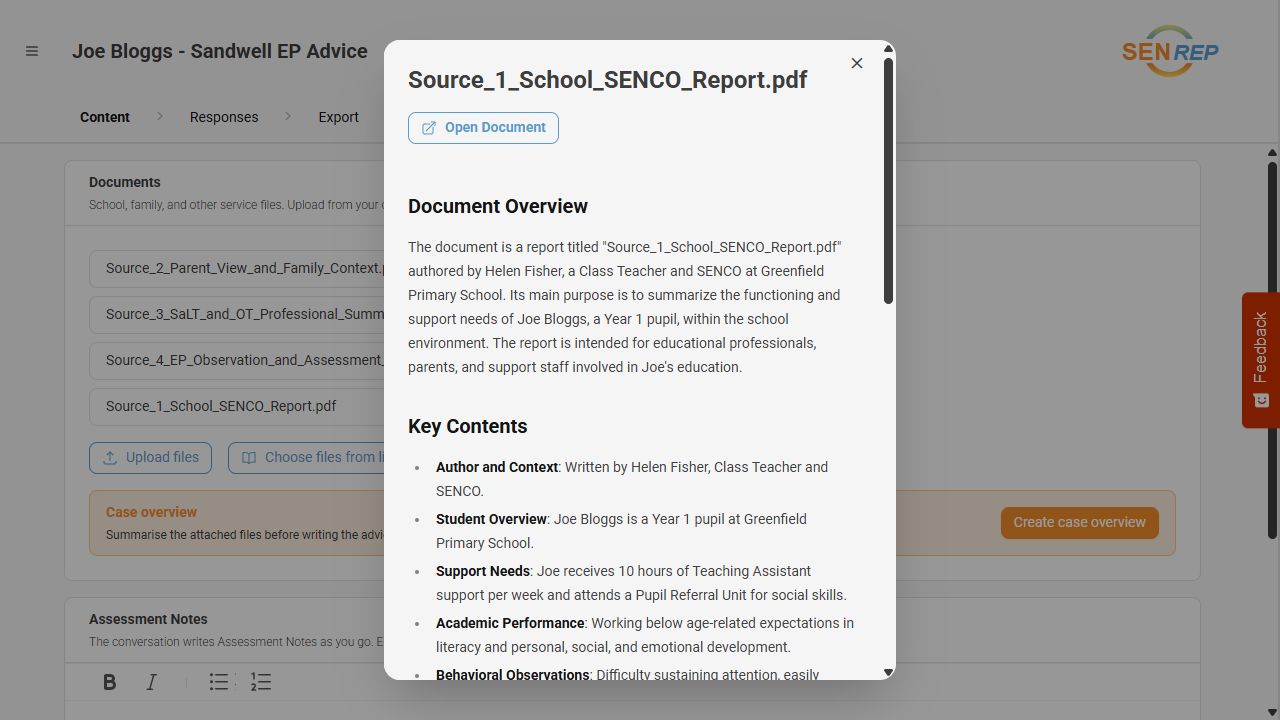
Get a first view of a document

Open a summary to see what a school report contains and what may be relevant to your advice. Then return to the original to check a point in context.

Begin with one document. You can decide how it helps with the work you already do.

Open the summary example
School-report summary in a synthetic case, showing the document overview and Open Document control.
Document summary using synthetic case material. Open the full-size image to look more closely.

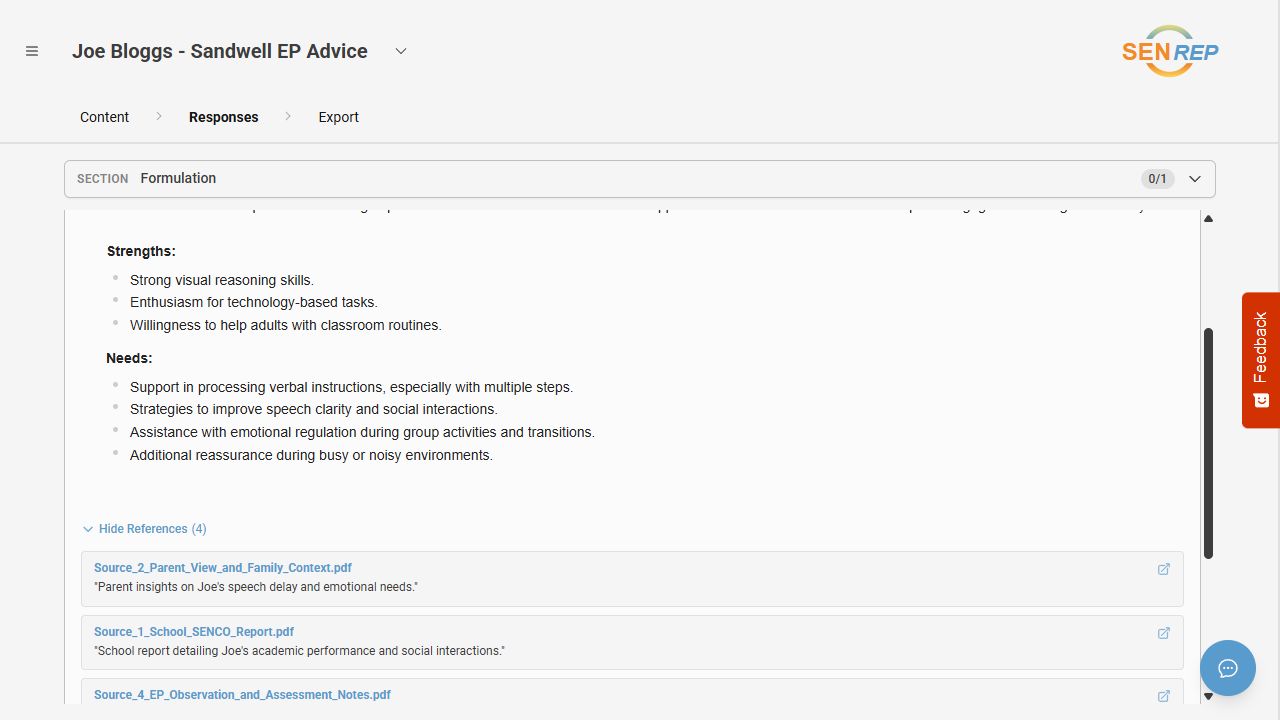
Check the sources behind a section

Open a draft section's references to see the supporting documents. This example brings parent views, school information and assessment notes into view.

You check the evidence and make the wording your own before including it in your advice.

Open the source-reference example
Synthetic Sandwell report showing strengths and needs with references to parent views, a school report and assessment notes.
Source references in a synthetic test case. References help you check the advice against the original evidence.

Already have EP advice drafted outside SENrep?

An available standalone audit can be another starting point. It offers findings for you to review, without first drafting the report in SENrep. Ask which audit templates are available to your organisation.

The current EP advice workflow

Support from preparation to final document.

  1. 01

    Understand the evidence

    Attach supporting documents and notes. Use summaries to orient yourself, then return to the originals to check detail and context.

  2. 02

    Shape the advice

    Work within an available local-authority template. Review and edit draft sections using your assessment, formulation and professional judgement.

  3. 03

    Check what needs attention

    Use an available audit to prompt a closer look at the advice. The EP decides which findings matter and what to change.

  4. 04

    Take the report into Word

    Export reviewed advice into the supported Word template, then check and finalise the document through your usual process.

Local structure. A Word document you can work with.

Authority templates differ in how they organise strengths, needs, outcomes and provision. SENrep's supported EP advice templates retain those local structures for drafting and Word export.

Tell us the authority's EP advice format you use. We can discuss the relevant template and confirm availability for your organisation. Review an applicable Word output as part of your demonstration.

Discuss your report format

Introducing SENrep to your service

Start with the work your team needs help with.

For an independent practice, an EP service or a local-authority team, the useful question is how SENrep fits your professional process. Bring your report requirements and the questions your colleagues need answered.

Choose a relevant task

Identify a preparation, drafting or review task. Discuss your authority's format and the templates your practitioners would need.

Inspect the experience and output

Look at evidence summaries, professional edits, audit findings and Word output. Consider checking and correction effort alongside any time saved.

Discuss organisational fit

Cover access, local configuration, pricing, setup and support. Include your information governance or IT questions before deciding how to proceed.

Discuss SENrep for your service

Looking beyond EP advice

Working with another SEND report type?

We currently support EP advice. If you write other SEND reports, tell us about the tasks and formats you need to help inform what we explore next.

Tell us about the reports you write

Questions before you begin

Understand the fit.
Ask about the detail.

For product, pricing or organisational questions, contact [email protected].

Who is SENrep for?

SENrep supports writing reports about special educational needs and disabilities (SEND). Today, its supported workflows and templates are for educational psychology advice: educational psychologists (EPs), EP services and independent practices are the current users. Local-authority leaders and other stakeholders can explore how that advice fits their requirements.

Can SENrep support other SEND report types?

EP advice is what we currently support. If you prepare another kind of SEND report, tell us about your work and the formats you use. We welcome conversations about other report-writing needs; these are enquiries about possible future development, with no availability or delivery date promised.

Do I have to draft a whole report in SENrep?

You can start with an individual document summary or use an available standalone audit to review advice drafted elsewhere. You do not need to use every stage of the workflow. Available templates and access depend on your organisation.

Does AI make the professional decisions?

The educational psychologist remains responsible for interpreting the evidence, developing the formulation, checking wording and finalising advice. Summaries, drafts and audit findings require professional review. A source reference or audit rating does not establish that advice is correct.

Will it fit our local-authority template?

SENrep currently includes authority-specific EP advice templates and Word exports. Ask about your authority so the relevant template, version and access can be checked. Local requirements differ; confirm the output against your service's expectations.

How can we assess value for our service?

Start with the tasks that take your team most effort. Assess preparation, checking, editing and final Word work together, alongside advice quality and usefulness to recipients. A demonstration can help you identify which workflow to evaluate.

Where can I ask about pricing, setup and support?

Include these topics in your demo request or email [email protected]. Describe your organisation and the report tasks you want to discuss, so the conversation can cover your requirements.

What about data handling and organisational review?

Ask for information about the service's data handling and technical arrangements before introducing it to your organisation. Include questions about providers, access, retention and deletion, and discuss your local review requirements. Please keep personal case information out of website enquiries.


For families, young people, schools and other professionals

A clearer picture of the support behind the advice.

Educational psychologists use information from assessment, families, schools and other professionals to understand a child's strengths, needs and circumstances. SENrep is a tool that helps them organise that information and prepare or review written advice.

The psychologist remains responsible for the advice. They need to check the facts, represent the child and family's views accurately, and apply their professional judgement. SENrep does not itself decide a child's support or the outcome of an education, health and care plan process.

Questions about an assessment or report?

Speak to the educational psychologist or service responsible for that work. They can explain the advice, how information was used and how to raise an inaccuracy.

For questions about SENrep itself, email [email protected]. Please do not include a child's personal information in a website enquiry.

Let's look at a task from your work.

Explore the current EP advice support, or talk to us about another SEND report writing requirement. We can walk through what is available and discuss your questions.